EMT Practice Test

1. Question Content...

Question List

Question1: Scenario
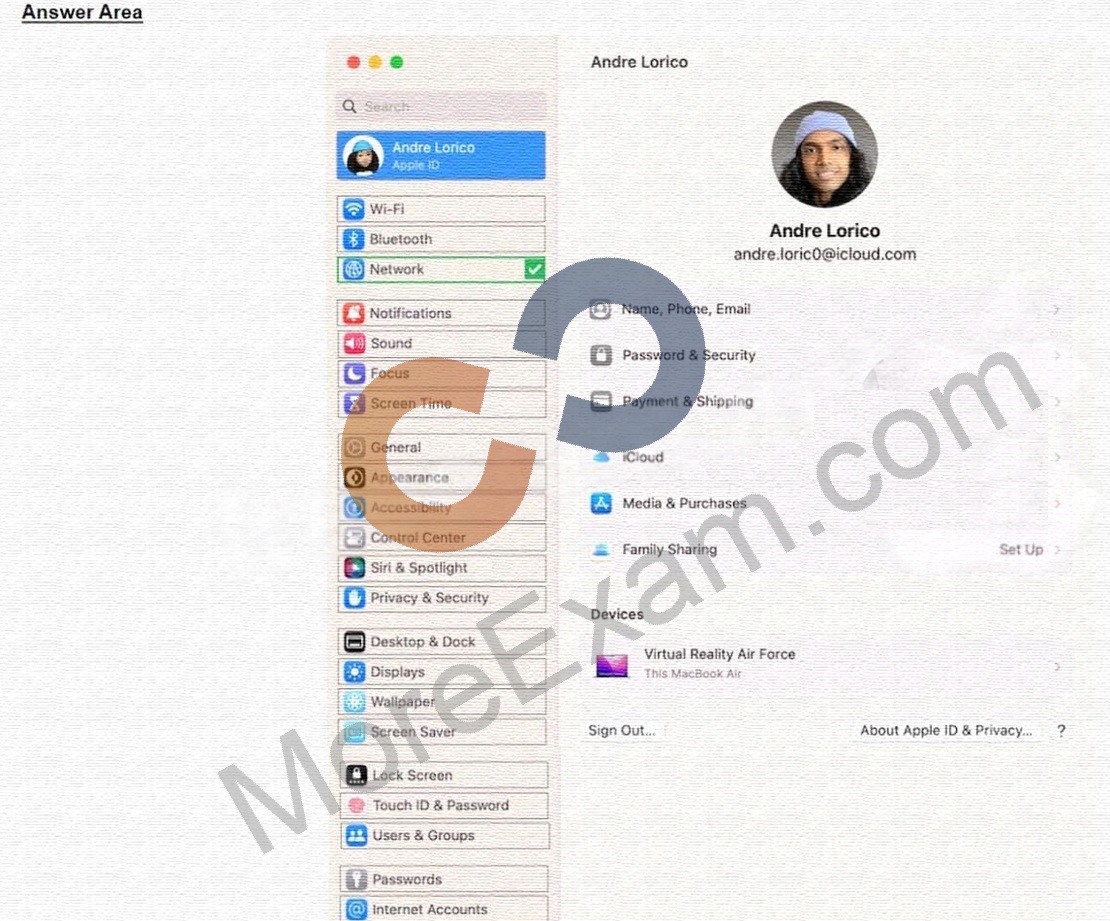
Andre created a Keynote presentation on his iPad that he wants to access on the desktop of his MacBook Air.
Select the setting in the sidebar that Andre should turn on to access iCIoud Drive on his Mac.

Question2: After Krista installed some new apps, her Mac became slow and unresponsive. She asks if you can help resolve the issue. Which resource should you use to examine processes running on Krista's Mac and check how they're affecting its performance?

Question3: Select Three.
In MacOS on APFS volumes, when are FileVault encryption keys generated?

Question4: Guillermo is a designer for ACME, Inc. He uses his 12.9-inch iPad Pro to create marketing materials and do color grading.
Which iPadOS feature should Guillermo use to allow his 12.9-inch iPad Pro to accurately display colors for common color standards?

Question5: Scenario
You configured a VPN server that supports the L2TP over IPSec protocol. You would like to add the VPN configuration to your Mac.
Which action menu option should you use to manually configure VPN in Network settings?

Question6: Which folders normally appear at the root level of the storage volume in the Finder on a Mac?

Question7: Which App Store app should you use to reset your Apple ID password when you use a friend's or family member's iPhone or iPad?

Question8: Use this image to answer the question.

What does this iPhone Privacy Warning message indicate?

Question9: Use this image to answer the question.

Why is the screen sharing service disabled with the message "This service is currently unavailable"?

Question10: Which three things happen to web browsing when Lockdown Mode is turned on for iPhone?

Question11: Where can you change the undo send delay setting on your iPad?

Question12: Which screen indicates that iPhone is in recovery mode and ready to be updated or restored?

Question13: How to put an iPhone in recovery mode?

Question14: What does Find My use to locate lost or missing devices?

Question15: What is the feature on iPhone called where you can convert your physical SIM card to an eSIM?

Question16: How should you force your Mac to reinitialize a peripheral device's connection and reload any peripheral-specific drivers?

Question17: Which IP address might indicate a DHCP issue?

Question18: Select the setting in the sidebar that you should use to turn on FileVault.

Question19: Which iPadOS feature should you configure to hide your personal email in the Mail app while you're at work?

Question20: How do you reset the printing system from Printers & Scanners settings on a Mac?

Question21: Select two.
What methods can you use to lock notes in the Notes app?

Question22: How should you schedule an email to send in Mail on iPhone?

Question23: Which Apple technology lets you wirelessly connect to a printer without downloading or installing any drivers?

Question24: What should you do in the app's Get Info window if your Mac with Apple silicon doesn't recognize a needed app plug-in when you open the app?

Question25: Match the Wi-Fi menu bar icons on the left to the descriptions on the right by dragging the responses to the correct target areas. Responses may be used once, more than once, or not at all.

Question26: Scenario
Antonio recently bought his iPhone 14 Pro Max. It's taking over an hour to charge the device to 50% using his
5W USB power adapter that came with his previous iPhone.
Why can't Antonio fast charge his iPhone?

Question27: Use this image to answer the question.

How do you get to this screen on iPhone?

Question28: How do you start up into fallback recoveryOS on a Mac with Apple silicon?

Question29: Select three responses.
Which three scenarios cause Apple File System (APFS) volumes to generate encryption keys?

Question30: Match the user types on the left to the descriptions on the right by dragging the responses to the correct target areas. Responses may be used once, more than once, or not at all.

Question31: Match the startup icons on the left to the descriptions on the right by dragging the responses to the correct target areas. Responses may be used once, more than once, or not at all.

Question32: Match the Apple Configurator actions on the left to the descriptions on the right by dragging the responses to the correct target areas. Responses may be used once, more than once, or not at all.

Question33: Where do you go to tell if an iPad has an MGM solution installed?

Question34: How can you control who can discover your iPhone or iPad when it's within AirDrop range?

Question35: How many fingerprints can you register to a single user on your Mac?

Question36: How should you check the progress of an installation and error entries when troubleshooting an application installation issue on a Mac?

Question37: Select three responses.
Which three conditions might require you to enter your passcode instead of using Face ID?

Question38: You're ready to transfer a sysdiagnose from your iPad to your Mac.
Where in System Settings can you locate the log file on iPad?

Question39: How many days do you have to recover deleted files from iCIoud Drive?

Question40: Where do you delete users in System Settings?

Question41: If you need to sync data from iCIoud to your Windows PC, what must you do?

Question42: You're reviewing the manual page for the defaults command in Terminal.
What should you do to exit a manual page in the Terminal window?

Question43: You are trying to connect a podcast mic to your mac. You go into Sounds, but the mic isn't appearing an as option. Where else can you check to see if the mic is properly connected to your mac?

Question44: Which troubleshooting steps should you follow if Quick Start does NOT automatically discover the other device?

Question45: Select the setting in the sidebar that you should use to turn on Find My on your Mac.

Question46: Scenario
Guillermo wants to annotate the Keynote presentation he created on his Mac on iPad.
Select three responses.
What does he need to do for Handoff to work on both devices?

Question47: You use Apple Watch 6 to track your physical activity and health metrics, but you have some trouble seeing the screen and using the watch controls.
Which iPhone feature can you use to help you see and operate Apple Watch more easily?

Question48: How do you start up in safe mode on a Mac with Apple silicon?

Question49: What should you do if an app on your iPhone stops responding?

Question50: What can you do if you forget your iPhone passcode?

Question51: Which of the following IP address suggests there may be a problem with DHCP?

Question52: Select the setting in the sidebar that you should use to delete a user on your Mac.

Question53: Which app should you configure to get live image descriptions of your surroundings on iPhone?

Question54: How to access Emergency SOS on your iPhone?

Question55: Scenario
ACME, Inc. suffered a power loss while you were upgrading to a major version of macOS on your Mac Studio. The Mac now shows only a black screen. You tried to revive the computer using Apple Configurator for Mac, but the revive was unsuccessful.
Which Apple Configurator action should you try next on your Mac Studio?

Question56: Which Find My feature is available ONLY on MacBook models with Apple silicon?

Question57: Which Apple program should you join if you're in charge of testing your organization's infrastructure and its ability to work with the Apple software before public release?

Question58: Which wireless authentication method allows a Mac to use digital certificates to authenticate to secure wireless networks?

Question59: Which option can you access to view the current activity of Apple Configurator for Mac?

Question60: At what Wi-Fi signal level will trigger iPhone or iPad to search for a stronger Wi-Fi network?

Question61: Where are sysdiagnose log files located on iPhone?

Question62: ACME, Inc. wants all users to see mounted servers in the Finder by default.
Which terminal command should you use to modify the Finder preferences to display mounted servers?

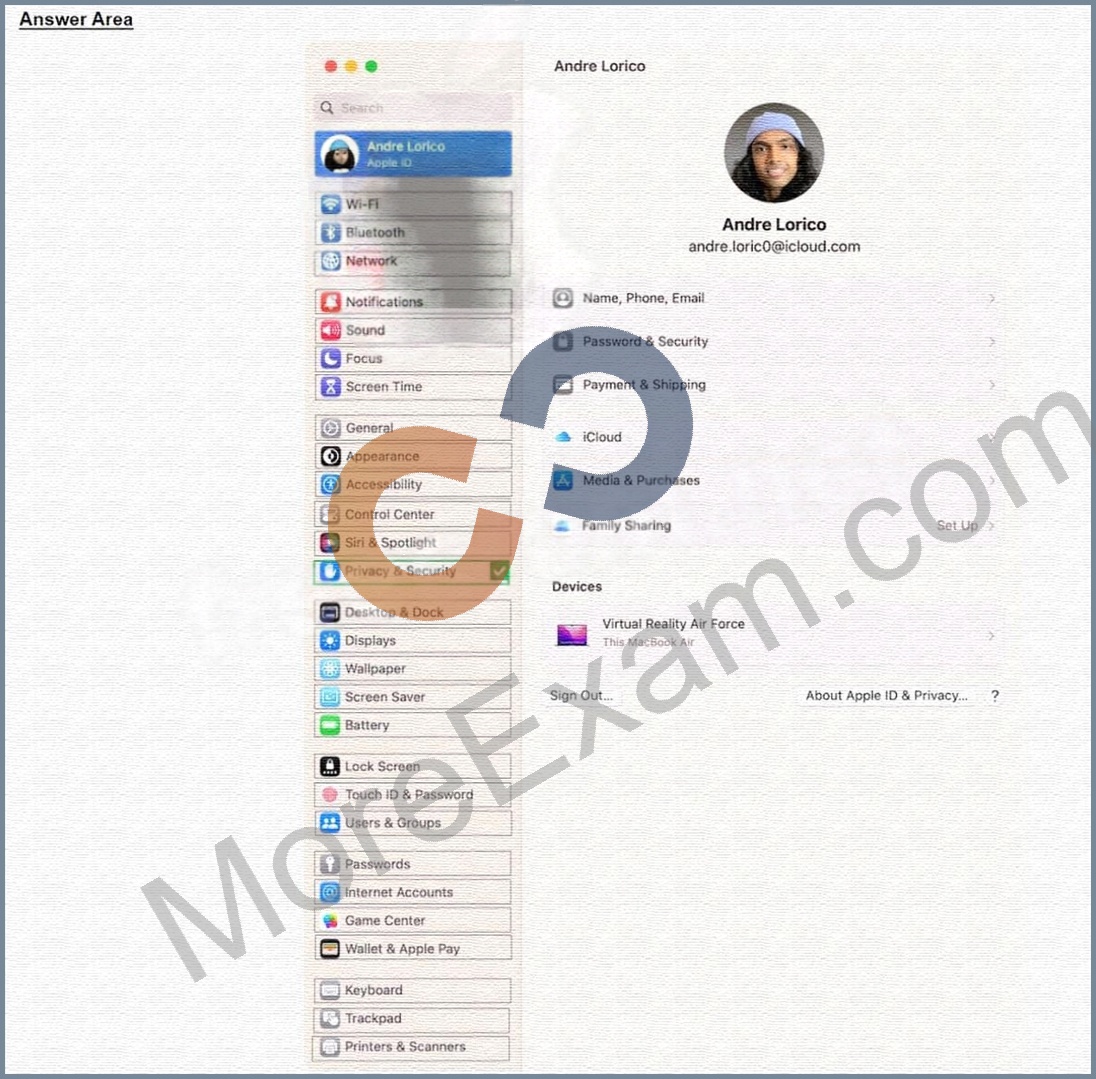
Question63: Select the setting in the sidebar that you should use to turn on Lockdown Mode.
Question64: Scenario
You're setting up a new MacBook Pro to replace your current MacBook. Both Mac computers are using the current version of macOS.
Which utility should you use to move data from your current MacBook to your new Mac using Setup Assistant?

Question65: What enables applications to be run on Apple silicon macs that were originally built for intel based macs?